Baby Tracker: Pregnancy App
- 0.0
- Rating
- 50.00K
- Installs
- Free
- Price

 Analysis by App-foxy
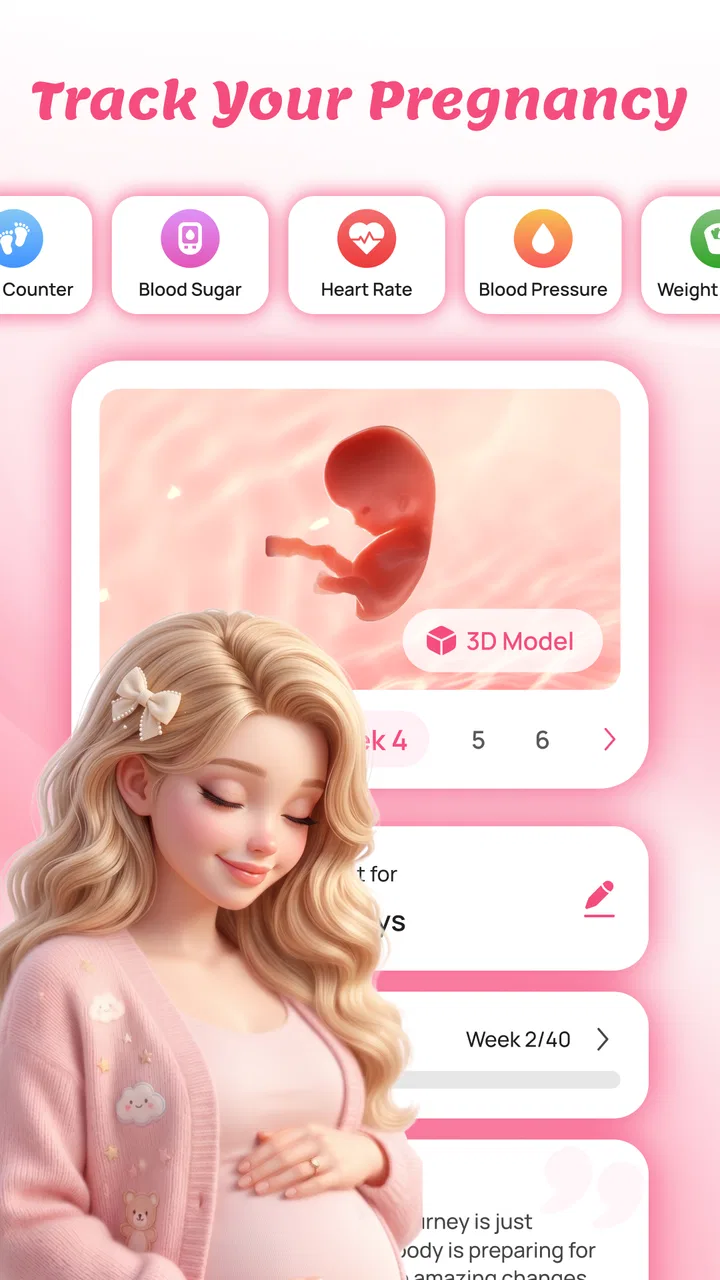
Pregnancy tracking is often less about collecting perfect information and more about making sense of changing days. Baby Tracker: Pregnancy App from Imgori LLC takes that practical approach by bringing baby-growth tracking, pregnancy guidance, and a personal daily diary into one parenting app. I found its appeal strongest when I treated it as a calm record of my own experience rather than as a replacement for a midwife, doctor, or pregnancy book.
The app is free to start, aimed at Everyone, and available for Android devices running at least Android 7.0. It has passed the 50K-install mark, which gives it a modest but established presence rather than the feeling of an unknown experiment. The current release is version 4.0.0, and optional purchases range from $6.99 to $14.99 per item. Those details matter because the basic idea is easy to understand, but the value depends on whether you want a simple companion or a more complete pregnancy-planning tool.
How the app feels to read and navigate
My first impression was that the three main purposes are easy to understand: follow pregnancy progress, read useful tips, and write down personal notes. That separation is important. Many pregnancy apps overwhelm people with a constant stream of articles, while a diary app may leave users without any context. This one sits between those two approaches, giving the diary a reason to exist alongside the tracking and educational material.
You May Also Like

 Blood Strike: 2.5 Anniversary
Blood Strike’s Loadouts Turn Every Drop Into a Tactical Gamble
A close look at Blood Strike’s custom loadouts: how fast access to signature weapons reshapes its battle royale rhythm, rewards preparation, and narrows the gap between fights.

 Pandora - Music & Podcasts
Pandora’s Music Is Easy to Start, but Harder to Recover
Pandora’s strength is its low-effort path from a seed to a station. Its weak spot is how much confidence it asks you to place in connection, setup, and quiet recovery.

 8 Ball Pool
 Is Built on Rivalries, Rematches, and Routine
A close look at the rivalries, rematches, shared routines, and unanswered safety questions that turn a quick pool match into a persistent mobile community.

 Samsung Music
’s Quiet Strength Is Playing What You Already Own
Its reach comes less from spectacle than from dependable access to a personal library. That simplicity is both the app’s strongest retention engine and its ceiling.

 AccuWeather: Weather Radar
AccuWeather Review: A Quick, Clear Forecast for Everyday Decisions
For everyday plans, the best forecast is the one you can understand quickly. AccuWeather makes rain timing, radar, and local conditions easy to act on, with a few trade-offs.

 Hill Climb Racing
Why Hill Climb Racing Still Turns Crashes Into One More Run
A tiny car, a bumpy hill and one more upgrade: Hill Climb Racing keeps resurfacing because its simple chaos makes every near-miss feel personal.
More From Our News Desk



I would describe the experience as approachable for someone who does not want to learn a complicated health dashboard. The most useful habit is to decide what you want to do before opening it. If I wanted to remember how I felt that day, I went straight to the diary. If I was curious about the baby’s development, I used the growth area. If I needed a small piece of general guidance, I looked through the pregnancy tips instead of scrolling aimlessly.
That sounds simple, but it is a meaningful accessibility advantage. People dealing with tiredness, nausea, stress, or a busy household often have limited attention for dense navigation. A clear three-part mental model reduces the amount of remembering required. I also recommend keeping diary entries short at first. A few words about energy, sleep, discomfort, or an appointment are more sustainable than trying to create a polished journal every evening.
The app’s content is easier to use when viewed as a personal reference layer. Growth information can help make a week feel concrete, while the diary captures details that generic weekly summaries cannot. The combination is particularly useful for users who like to notice patterns. For example, I could record that a certain day felt unusually tiring and later compare that note with the broader stage of pregnancy instead of relying on memory.
There is also a difference between readable information and actionable medical advice. Pregnancy tips can be helpful for orientation, but I would not use any app entry to diagnose a symptom or decide whether professional care is necessary. The best workflow is to use the app to prepare questions, record what happened, and keep important concerns visible for a qualified healthcare professional.
Making text and information easier to handle
Readability is not only about font size. It is also about the amount of information presented at once, the wording of headings, and whether a user can return to a task without losing their place. Baby Tracker: Pregnancy App benefits from having a narrow purpose, but individual comfort will still depend on the phone, display settings, and the user’s vision or concentration.
For someone with low vision, I would pair the app with the phone’s own display enlargement, text-size, contrast, or screen-reader settings where available. I cannot treat those operating-system tools as proof that every element inside the app will behave perfectly with assistive technology, so I would test the most important screens early: the growth view, the tips section, and the diary entry flow.
People with dyslexia or anyone who finds long passages tiring may get more from the app by using it in brief sessions. Read one tip, write one note, and leave. The diary is especially well suited to this approach because it can turn a vague feeling into a short, searchable personal record without demanding a long paragraph.
A useful, non-obvious routine is to create a personal vocabulary for entries. Instead of writing “not feeling good,” I would use consistent terms such as “sleep,” “energy,” “mood,” “appointment,” or “question.” This does not add a new app feature, but it makes the diary more useful later. Consistent wording helps me scan old notes quickly and prepare a clearer conversation at an appointment.
Motor, sensory, and cognitive considerations
Pregnancy can make small, precise interactions more annoying than they appear on paper. One-handed phone use, shaky hands, fatigue, or simply holding the device while caring for another child can change whether an app feels comfortable. I found the diary concept best suited to short entries rather than elaborate writing sessions. If typing is difficult, the practical workaround is to use the phone’s built-in voice input and then check the result before saving.
That workflow is also useful for users with repetitive-strain concerns. Instead of opening the app repeatedly throughout the day, I would keep a short note elsewhere and transfer a summary during one deliberate check-in. This reduces tapping and avoids turning the tracker into another source of interruptions. The trade-off is that the diary becomes less immediate, so it works best for people who can remember the key detail until that check-in.
Sensory comfort is more personal. Notifications, bright screens, dense pages, or frequent reminders can be distracting during a difficult pregnancy day. I would begin with a low-interruption routine and adjust the phone’s system settings if the display or sound becomes tiring. Since I would not assume that every sensory preference is handled inside the app itself, users who are especially sensitive should judge it during a quiet trial rather than committing to a long daily routine.
For users with memory difficulties, the app’s diary can serve as an external memory rather than just a keepsake. I would write down the date of an appointment, a question to ask, or a symptom to mention. Still, a diary entry should not be treated as an emergency alert system. If something feels urgent, waiting to document it in an app is the wrong workflow.
Users with anxiety may appreciate the structure but also need boundaries. A growth tracker can make pregnancy feel more understandable, yet checking it repeatedly can become reassurance-seeking. My recommendation is to choose a regular time to review progress and avoid turning every sensation into a tracking task. The app is more helpful when it supports reflection than when it encourages constant monitoring.
Using it in real situations and different contexts
Imagine a user who wakes up tired, has a busy workday, and remembers an important question only while commuting home. A realistic routine would be to make a brief diary note using voice input, then review the relevant pregnancy guidance later when there is enough attention to read it properly. At the next appointment, that note can help turn a vague memory into a specific question. This is where the app earns its place: not by replacing care, but by reducing the amount of information a person has to hold in their head.
It can also suit a partner or family member who wants to understand the pregnancy without taking over the experience. The diary should remain personal, while the general growth and tips sections can provide a shared starting point for conversation. I would be careful about sharing the phone casually, though, because a private journal can contain sensitive feelings or health-related details. The app works best when the pregnant user controls what becomes a shared discussion.
For someone with limited connectivity or an unpredictable schedule, I would test the exact screens they need before relying on them away from home. The safest assumption is that an app should not be the only place where essential appointment details or urgent medical instructions are stored. Keep critical information in the channel recommended by your healthcare provider, and use this app as a convenient companion rather than the sole record.
Language and health-literacy needs deserve attention too. General pregnancy tips may be easier to understand than medical literature, but plain wording does not make every topic universally clear. If a phrase is confusing, I would not guess at its meaning. I would write the question in the diary and ask a clinician. That turns uncertainty into something useful instead of allowing a misunderstood tip to influence a decision.
The app is also a reasonable fit for people who dislike rigid schedules. A daily diary sounds demanding, but it does not need to become a daily performance. I would use it on days when there is something worth remembering and keep entries lightweight. Conversely, users who want automatic, highly detailed health measurements may prefer a dedicated wearable or a more specialized medical-tracking product. This app’s strength is the blend of manual reflection and pregnancy context, not advanced hardware monitoring.
Where it differs from ordinary alternatives
A paper journal offers more freedom and privacy in the physical sense, but it cannot place a pregnancy-development reference beside the note you are writing. A general notes app is flexible, yet it leaves you to build your own structure and find reliable pregnancy reading elsewhere. A calendar can remember appointments, but it is not designed to capture the emotional and physical texture of a pregnancy day.
Baby Tracker: Pregnancy App occupies the middle ground. It is more guided than blank notes and more personal than a stream of generic articles. That middle position is useful for a first-time parent who wants a single starting point without managing several separate tools. It is less compelling for someone who already has a carefully organized health system, a trusted pregnancy book, and a journal they genuinely use.
The trade-off is that a focused app can feel limited when your needs expand. If you want comprehensive appointment management, medication schedules, shared family accounts, wearable integrations, or detailed clinical records, I would look for a product built specifically around those functions. I would not choose this app merely because it contains the word “tracker.” Its real value is the combination of growth context, tips, and a personal diary.
Remaining barriers before making it part of your routine
The optional purchases are the clearest practical consideration. The app is free, but some items cost between $6.99 and $14.99. I would use the no-cost experience first and decide whether the extra material changes my routine enough to justify spending. A purchase is easier to evaluate after I know whether I actually return to the diary and read the guidance.
Another limitation is the risk of false confidence. A polished progress view can feel authoritative even when it is only general information. Pregnancy does not always follow a neat timeline, and individual concerns cannot be settled by a weekly description alone. I would treat the app as an organizer and educational companion, not as a diagnostic tool or a substitute for prenatal care.
Privacy is another reason to be deliberate. A pregnancy diary may include intimate emotions, symptoms, appointment notes, and family information. Before writing anything I would not want casually exposed, I would review the phone’s lock settings and think about who can access the device. I would also keep a separate backup of information that matters medically or administratively, using a method I already trust.
Accessibility testing should be personal rather than assumed. A user with visual, motor, hearing, cognitive, or sensory needs may have a very different experience from mine. I would test navigation with the phone’s preferred accessibility settings, check whether voice input produces accurate diary text, and see whether the most important content remains understandable when the screen is enlarged. If one essential task is consistently difficult, that is a strong reason to choose another app, even if the overall concept is appealing.
Finally, the app may not suit users who want a completely passive experience. The diary depends on the user choosing to record something, and useful reflection comes from returning to those notes. That manual involvement is a strength for people who want ownership of their story, but it is a weakness for anyone expecting automatic, comprehensive tracking with little effort.
My inclusive verdict
I see Baby Tracker: Pregnancy App as a friendly, focused companion for people who want three things in one place: a way to follow baby growth, approachable pregnancy guidance, and a personal record of the journey. Its free entry point and Everyone rating make it easy to consider, while the Android 7.0 minimum keeps it accessible to many older devices. Imgori LLC has kept the concept understandable rather than turning it into an intimidating health-control panel.
I would recommend it to a first-time parent who wants structure but does not want to manage several separate apps. I would also recommend it to someone who finds that appointments and everyday symptoms blur together, because the diary can preserve small details that are otherwise forgotten. The best results come from short, consistent notes and from using the tips to form questions, not from checking the app compulsively.
I would skip it if you need advanced medical records, automatic sensor data, extensive collaboration, or a fully hands-off tracker. I would also choose another option if the key screens do not work comfortably with your accessibility settings. No single pregnancy app can serve every body, schedule, reading preference, or care plan.
My final advice is to try it as a lightweight weekly companion first. Write a few practical notes, read the growth information at a calm moment, and see whether the structure genuinely reduces mental load. The strongest reason to keep it is not the amount of information; it is the way it can turn scattered pregnancy memories into a clearer personal record. Used with sensible privacy habits and professional medical care, it is a worthwhile free starting point for pregnancy tracking, especially for users who value reflection as much as reminders.
FAQs for Baby Tracker: Pregnancy App
01What is Baby Tracker: Pregnancy App used for?
Baby Tracker: Pregnancy App is designed to help expectant parents follow pregnancy progress in one place. It may provide weekly information about fetal development, pregnancy milestones, appointment reminders, weight or symptom tracking, and preparation tools. The exact features can vary by version and device, so users should review the current store listing before downloading and decide which tools are genuinely useful for their personal routine.
02Can Baby Tracker: Pregnancy App replace advice from a doctor or midwife?
No. The app should be treated as an organizational and informational companion, not as a medical professional. Pregnancy symptoms, test results, medication questions, and concerns about the baby should always be discussed with a qualified doctor, midwife, or other healthcare provider. Information shown in the app may be general and cannot account for individual medical history, complications, or changing clinical circumstances.
03Does Baby Tracker: Pregnancy App require an internet connection?
Some functions may work without a constant connection, particularly basic tracking or previously loaded information, while other features can depend on internet access. Online content, account synchronization, advertisements, cloud backups, or updates may require connectivity. Before relying on the app during travel or at medical appointments, users should test which features remain available offline and check whether mobile data usage is acceptable.
04Is Baby Tracker: Pregnancy App free to download?
The application may be available as a free download, but users should carefully check the current Google Play or App Store listing for advertisements, premium tools, subscriptions, or optional in-app purchases. Pregnancy apps sometimes place detailed reports, extra content, or advanced tracking behind a paid plan. Review the billing terms, renewal settings, and cancellation process before starting any trial or subscription.
05What privacy considerations should users know before using the app?
A pregnancy tracker can contain sensitive information, including symptoms, cycle details, appointment notes, weight, estimated due dates, and personal health-related data. Before creating an account or entering information, read the app’s privacy policy and permissions carefully. Check whether data is stored locally or online, shared with service providers, used for advertising, or removable if you decide to stop using the application.
Pros
- Clear week-by-week pregnancy guidance for tracking your baby's development.
- Useful tools for logging symptoms
- appointments
- weight
- and important milestones.
- Personalized reminders help you stay organized throughout pregnancy.
- Simple interface makes daily updates quick and easy to record.
- Helpful educational content supports first-time parents with practical information.
Cons
- Some advanced features may require a subscription or in-app purchase.
- Content is general and should not replace advice from your healthcare provider.
- Frequent notifications may feel excessive if reminders are not customized.
- Privacy-conscious users should review how health and pregnancy data are handled.
- The amount of information can feel overwhelming during the early setup.

Baby Tracker: Pregnancy App
Gallery